
Google Search (Google built-in calculator) is awesome enough, when I type 1 foot = ? inch it gives me perfect answer, Actually my query to Google is "1 foot is equal to how many inches", when I enter the same query like "1 foot is equal to how many inches" in the Google Search Box, the Google Calculator has not given me the answer.
When I re-entered the query like "1 foot = ? inch" in Google search, it has given me the perfect answer and Google built-in calculator works fine. The Google's built-in calculator function can solve math problems involving basic arithmetic, more complicated maths. You can see the same in the screen shot below:
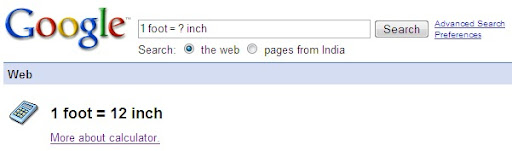
You would like to know more about Google built-in calculator and other Google Web Search Features then click here to go.
Related Posts:
Recap GMail Keyboard Shortcuts
Export a presentation into PDF/PPT using Google Docs
1 foot = ? inch, search criteria works perfect in Google Search
Upload images to an FTP server using Live Writer
Some Web Blogs will not support hosting images, if you are using these type of services and you want to include images in your blog article posts, you have to contact your ISP or hosting services to host your respective pages on an FTP server, and then link to the images from your blog post.
Its very easy to change your image settings to upload respective images to an FTP server using Windows Live Writer:
1. On your Weblog menu, click Edit Weblog Settings. 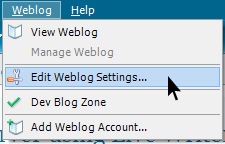
2. On the Images tab, click Upload images to an FTP server, and then click Configure FTP. 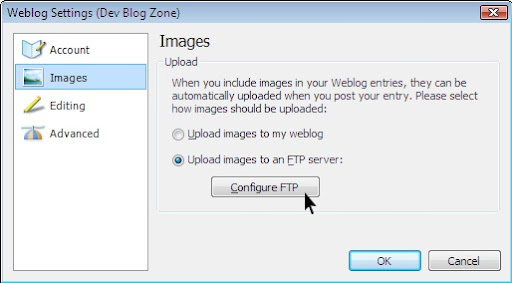
3. In the FTP hostname text box, enter your FTP hostname accordingly
4. Enter your Username and Password for your FTP account.
5. Publish images into this folder: Include the full path to the folder on the FTP server. To find the path, click the Browse button.
6. URL of image publishing folder: The web address of the folder where people can view your images. The address should start with http://, not ftp://. 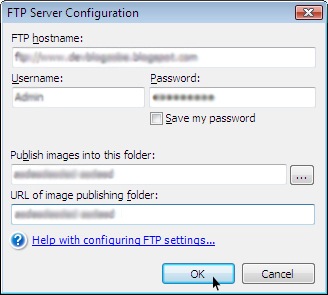
7. Click OK, and then click OK again.
Its Done!, from now you can directly upload your images to your respective FTP server and then link to the images from your blog post.
Related Posts:
Post an article for future dates using Live Writer
Post an article for future dates using Live Writer
Just two days back, blogger.com has officially introduced scheduling posts for future dates feature in blogger.com web blog. Through Windows Live Writer we can also make use of this feature, but your web blog should support this feature as blogger.com does.
After installing Windows Live Writer, while adding your web blog account, select the appropriate web blog you are using. Its very simple to schedule the post for future dates, after writing an article just click on the calendar icon which you see at the bottom right of your article post window.
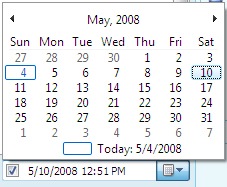
Select your appropriate date to post the article and publish your post. If you have a doubt that whether this is working, now go and check your blogger.com. Login to your account in blogger.com and click on Posting tab, in that choose Edit Posts, you can view your article which has been scheduled to your selected date, this means your post has been scheduled to the respective date which you have selected while publishing your article.

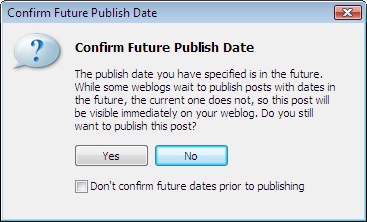
If your web blog does not supports scheduling feature, then while publishing the article Live Writer will raise an alert like the screen grab below, depending upon your possibilities choose Yes or No from the alert window:
Watch what you want and when you want using Adobe Media Player
Adobe introduces Adobe Media Player which is the next generation of Internet video delivery. This application has been built using Adobe AIR, which is a desktop application called RIA (Rich Internet Application). This Software provides control and flexibility to watch and enjoy with what you want and when you want. Its really awesome RIA application which Adobe as introduced.
This software provides flexibility to view your favorite episode offline or online. Just you need to queue up your favorite TV content, music track and you can download new and latest episodes automatically.
This Adobe Media Player has got many features like Catalog, Personal Videos, My Favorites, New Episodes... you have endless choices in front of you, Just its your call to choose your favorite Video or Music from the Internet. And this software will track new episodes, so that you can download and watch whenever you want. Now you can Rock with your favorite music and video's.
You can download this Media Player from here
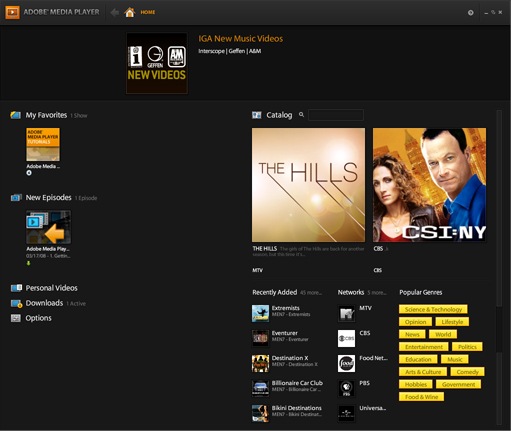
There are so many top participating networks for presenting you with favorite shows to view offline or online. Some of the top participating networks are Blip.tv, CBS, Comedy Central, Epicurious, KQED, MTV etc.,
Now schedule your posts for future dates using Blogger
Good News! for Professional Bloggers, now time has come to go for a long vacation by leaving respective blogs, since blogger.com has introduced a new feature, now you can schedule your posts to future date and time.

Blogger (blogger.com) now schedules future-dated posts, If you want to announce something new on a certain date and time now you need not to be at your computer desk to make a post and if you want your blog needs to be updated regularly with some posts when you are on Vacation, scheduled post publishing will help us in posting those important messages on time.
Its very simple to activate this feature, when you are drafting a post, on the post editor page, click on the "Post Options" just toggle to show the "Post date and time" fields. Then, type your relevant post date and time accordingly. When you click on the "Publish" button your post will be "Scheduled" accordingly to that date and time which you have entered. When the date and time of the post arrive then it will automatically published to your blog without your presence in front of your computer.

If you want to view your "Scheduled" Posts for this just click on "Edit Posts", in the "Edit Posts" table you can view your scheduled posts were listed there. In case if you want to Un-Schedule the post just simply save it as a draft any time before it gets published on to your Blog.

I would like to "Congratulate the Blogger.com Team" for this fabulous job. So Kudos to Blogger.com Team.

