Showing posts with label Yahoo. Show all posts

Yahoo Mail + Images + Lightbox.js = SlideShow

Wednesday, May 21, 2008

Attached images in New Yahoo Mail can be viewed as a SlideShow, Awesome enough feature provided by Yahoo.

Yahoo Mail

Attached Images are viewed as thumbnails and as per your requirement you can select respective image and can view the actual image of the same, and the same can be downloaded to your desktop.

Yahoo Mail Image View

This feature as got smooth slide show of the images and this SlideShow has been built using the lightbox.js
Continue reading »

See your Yahoo Mails in your Phone Browsers now in India

Monday, April 21, 2008

Want to see Yahoo Mails in your phone browsers then you guys need to type this URL into your phone's browser m.yahoo.com/mail

If you have Internet-enabled phone, you can access your yahoo mails at anytime, anywhere and at any place, what to send an email to your business partners or friends through your phone then you guys can make use of Yahoo Service, its awesome enough and with this you guys can keep in touch with your nearest one.

There are many more mobile services from Yahoo, like

Yahoo! Go, Yahoo! oneSearch, Yahoo! oneConnect, Yahoo! onePlace, Widget Gallery, Mobile Homepage, Mail, Messenger, Local, Flickr, News, Weather, Finance, Sports, Entertainment, Yahoo! on iPhone.

Yahoo Mobile Features

Continue reading »

How to find all unread messages in Yahoo New Mail

Wednesday, April 16, 2008

Earlier in our Yahoo Classic Mail, we have a very big process to find "unread messages", for example you have more than 400 or 500 mails in your inbox and your status shows as 11 Unread messages, then where do you search for those 11 Unread messages?, below are the steps to find out all "unread messages" in Yahoo Classic Mail:

To find all unread messages in all your Yahoo! Mail Classic folders:

  • Select Search Mail from the Yahoo! Mail.
  • Click on the Advanced Search link.
  • As the search criterion, specify: To, Cc, Bcc: contains.
  • Type . (that is a dot/period) in the entry field.
  • Next, make sure Search is selected under Options:.
  • Select Only Unread Messages from the drop-down menu.
  • Select all your folders under Look in folders:.
    • You may want to keep the Sent folder unchecked.
  • click Search.

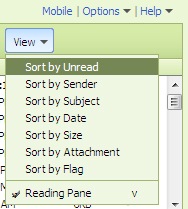
Need not to use those many steps in the New Yahoo Mail, Just click on the "inbox", from the menu bar provided click on "View" and from the option click on "Sort by Unread"

yahoo unread messages

Continue reading »

Launching of shine website - Yahoo

Wednesday, April 2, 2008

Yahoo does everything for everyone, recently Yahoo has launched one pretty new for Womens. This site has got everything like Fashion, Beauty, Healthy Living, Entertainment, Parenting. Love, Work, Money, Food and much more useful things. Using this site already registered members can do blogging, can manage blogging and can store some stuff in "My Stuff" section. Can view weather report, Horoscopes etc.,

Yahoo Shine WebSite

The look and feel of the site is awesome enough. Continue reading »