Showing posts with label Google. Show all posts

Free Voice Directory Service from Google now available for local Canadians

Monday, June 23, 2008

Google now launches their free voice service for Canadians. Google has expanded their's GOOG-411 service to Canada. If you are local Canadian, you can find business listings by dialing 1-800-GOOG-411 (1-800-4664-411) from any phone for free.


By this service you can now find and connect with new businesses. This service is still experimental but which offers all the same features available in the US. Such as free call, free connection, SMS info, iPhone "Map-It" integration etc.,

If you want to know more about the same, just have a look at this page - Talk to us: GOOG-411 now available in Canada

Related Articles:

Continue reading »

Edit your documents offline - Google Docs Offline

Friday, June 20, 2008

Google Docs is ramping up very well in the World of Web Offline, Google Docs now allows you to view or edit your documents offline, yeah that is without an Internet Connection. The application runs perfectly even in offline mode, make your necessary changes to your Document or PDF... and just sit behind one your Internet Connection is UP then it will automatically synchronizes and will upload all the stuff which you have made in offline.


To do all of this, you need to download Google Gears on to your desktop and install it accordingly on your desktop and enjoy sharing your documents to the world. Google Gear, an open source browser extension that adds offline functionality directly to your browser.

If you want to access Google Docs offline, just need to type http://docs.google.com into your browser window or the other way is to click on the desktop shortcut which is downloaded during the installation process.

So by looking above lines, you might have queries like How this going to work offline when there is no Internet Connection?

As said in the above lines Google Docs uses Google Gears, which is an open source browser extension which enables web applications to RUN OFFLINE. When you are offline, your edits which you have done for your documents will be stored on your local computer until you re-connect to your Internet Connection, when your Internet Connection is UP then the edits which you have done will automatically synchronized with 'Google Docs' severs and made available to collaborators. 

If you have more queries, then check with Google Docs Help Center

Recommended Articles from Google Docs:

  1. Overview: Enabling Google Docs offline
  2. Overview: What is Google Docs Offline?
  3. Overview: How does offline work?
  4. Using Google Gears: Installing / Uninstalling Gears
  5. Overview: Working offline

Related Articles, Which you like to Read from this Web Blog on Google Docs:
Now presentations can be embedded in Multiple Sizes - Google Docs
Export a presentation into PDF/PPT using Google Docs
Work offline with Google Docs
Adding your favorite Color to folder names in Google Docs

Continue reading »

Now you can see your trips in real 3D - buddyway.com

Wednesday, June 4, 2008

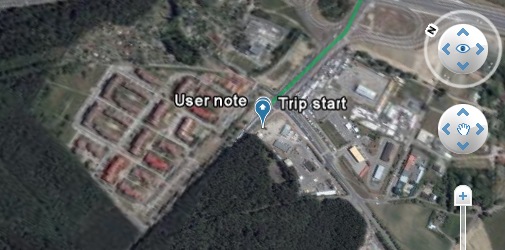
Buddyway.com has announced the release of Windows Mobile and BlackBerry version of Buddyway. Many enhancements has been done to buddyway pages, Layout has been changed a bit and Now this is using the amazing Google Earth Browser Plugin, so as to see your trips online in real 3D view, this feature is awesome enough. If you want to view an example of the same just move on to this page - http://www.buddyway.com/trip/buddie/trip-to-work/3dview/

Trip in 3D View - Google earth

If your browser supports Google Earth plugin, then you can view the things in real 3D view - if you have not installed Google Earth plugin then just go head and install the same to view in 3D. It takes a min to install the same, as we know Google Earth is awesome enough and has introduced 3D features in it.

And another awesome feature in Buddyway is from now onwards you get comments to your memorable trip, each trip that is made public have it's own page with 'friendly readable address' where users can comment it. And also improved charts, so that you can now has a feature of Zoom them in and out.

Related Links:
New features of Google Earth 4.3, Awesome!
Track and Save your Memorable Trip using Buddyway GPS phone tracking system

Continue reading »

A Cool and useful collection of Web Developer and Web Designer Resources!

Wednesday, May 28, 2008

WittyMarks, a cool and really useful collection of web resources for designers and developers.

And the site was launched by the team of top blog WittySparks.com, as they want to keep this site clean and neat with fully functional and useful resources like wordpress themes, plugins, open source scripts, javascripts, css tips, menus, widgets, tutorials, php, earn money, etc.

wittymarks

And this site just bookmark the best resources available to just serve the fellow developers around. In this regards this site have the registration open to all but the submissions are disabled unless a particular user is really want to contribute the best resources than submitting their own blog posts to promote themselves, to be a part of the team and to contribute the useful resources you just need to participate in their site regularly by voting the posts which you think is more useful and comment.


As the site is recently launched they already have a cool resources to look into, so why not encourage their team to submit more useful resources.

Subscribe RSS Feeds:
Just keep yourself updated with new resources everyday, don't forget to subscribe for the same - RSS Feeds 

Continue reading »

Create Collect and Control through sites.google.com

Friday, May 23, 2008

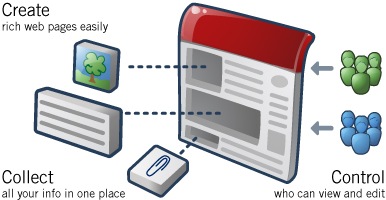
On Feb 28, 2008 Google has introduced Google Sites which is about to be known as an application, which helps us in Creating web pages, we can gather a bunch of data at a single location that is we can make use of this as a repository, and at the same time we can control those created things very easily.

Google Sites


With Google Sites, people can quickly gather a variety of information at one place like for example, we can collect our memorable moments clips in a Slide Show, including videos, calendars, presentations, attachments, and text, and can easily share it for a group or to the whole world.

Creating, Editing and Managing is very easy with this, no knowledge of HTML or Web design skills are required. You can start a new page in one click. All content is instantly searchable and can search for all the pages where you have kept your pages and in which folder very easily.

With Google Sites, people can create a wide variety of sites, such as:
-> an intranet to centralize company information;
-> a team site to manage a project;
-> a profile site including an individual's resume, areas of expertise, and goals for the quarter; and
-> a virtual classroom to post homework assignments, class notes and other resources.

And even more additional features has been included after launching this site, would you like to know more about this Google Sites, then you need to just login and avail those features those Google is giving us. Here is the site URL - http://sites.google.com and if you want to know more about the features of this in detail then you guys need to view this page - http://www.google.com/intl/en/press/pressrel/20082802_google_sites.html

Continue reading »

Please help earthquake victims in China, through Google donation page

Tuesday, May 20, 2008

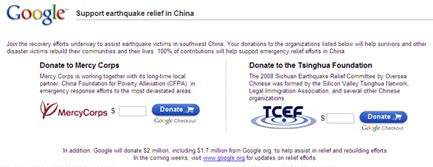
Come and join in helping the people who are the victims of Earthquake in SouthWest China, Google is doing a great job all the way round to help and support these victims by donating $2 million, including $1.7 million from Google.org.

Donation Page: http://www.google.com/chinaearthquake/


Google Donation Page

Google even calling us to join and help the people of SouthWest China by donating funds. They have put up a donation page using Google's payment system. Two organizations came up to help these people and which supports Google payment system. Through these two organizations you can pay your donations to help the survivors and other disaster victims to rebuild their communities and their lives.

Here is the donation page - http://www.google.com/chinaearthquake/

If you want to know any updates on relief efforts you need to visit www.google.org

Come! We All Together help the people of SouthWest China.

Continue reading »

Google always looks for great engineers, treasure hunt started

Sunday, May 18, 2008

Google Treasure Hunt has been started, check the below URL for further details... (All the best for the guys who are all participating in the Treasure Hunt)

Official Google Blog: Google Treasure Hunt update Continue reading »

Story behind Google Logo - May 18

Saturday, May 17, 2008

May 18, 1883, the day when a Great German Architect was born named "Walter Adolph Georg Gropius". Who was a German architect and founder of Bauhaus. He is known as one of the pioneering masters of "modern" architecture.

Google logo


He studied at the Technical Universities in Munich and Berlin. He joined the office of Peter Behrens in 1910 and three years later established a practice with Adolph Meyer. For his early commissions he borrowed from the Industrial Classicism introduced by Behrens.

Would you like to know more about Walter Adolph Georg Gropius, then check this link - http://en.wikipedia.org/wiki/Walter_Gropius

Continue reading »

Google now translates 23 different languages

Google has added new 10 languages to Google Translate, these languages includes Bulgarian, Croatian, Czech, Danish, Finnish, Hindi, Norwegian, Polish, Romanian and Swedish. By adding these 10 languages now it has a total of 23 different languages.


Users can now translate text and web pages between any two languages and can also perform cross-language searches. Google has added new feature called "Detect Language", this feature will help users to automatically identify the language of the text they are trying to translate. You can find more features at this location - translate.google.com


Continue reading »

Track and Save your Memorable Trip using Buddyway GPS phone tracking system

Wednesday, May 14, 2008

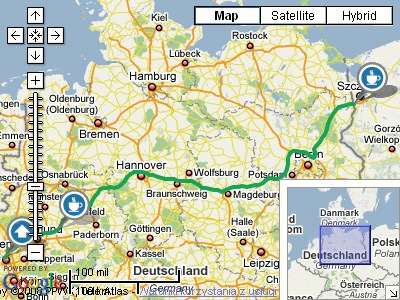
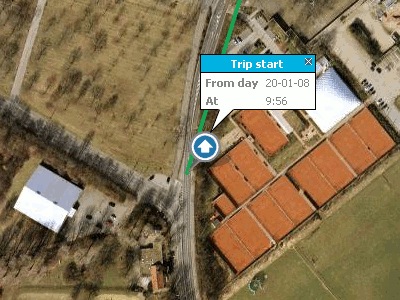
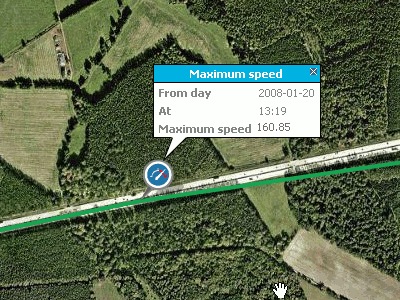
Now you can track and save your memorable trip using Buddyway a free GPS (Global Positioning System) cell phone tracking system. With this we can track and save your trips, share them with friends, view your trips in 3D in Google Earth, show friends your location.

Want to check out new features in Buddyway, then you need to visit this site http://www.buddyway.com, just register and avail the features which Buddyway is providing.

Track and Save

This Buddyway has got many features like:

1. Track & save your trips
2. Add your notes
3. View your trips
4. Set personal notifications
5. Share the trips with your friends
6. Save trips to Google Earth

Add Notes  

Just install Buddyway mobile application on your GPS enabled phone or PDA and take it with you on a trip. Add personal note from a trip with our dedicated mobile Buddyway application on your mobile phones. This Buddyway we automatically detect when you take a break and we mark it on the map. This is all for free :)

Save Speed

Continue reading »

Scrapboy desktop application for Facebook, MySpace and orkut users

Saturday, May 10, 2008

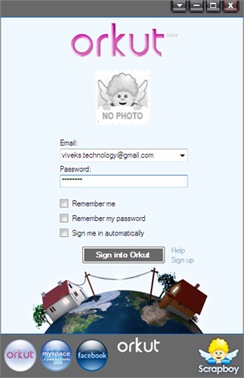
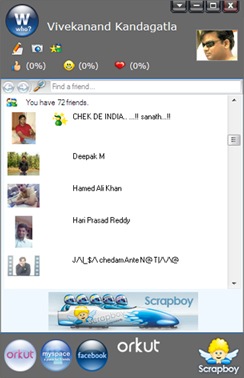
Scrapboy desktop application tool is for Facebook, MySpace and Orkut Users, and it has been designed to let you easily keep track of your social life via multiple Social Networking communities. Scrapboy is an Instant Messenger which notifies instantly with changes in your or your friend's profiles. It tracks of every one's messages. pictures and passions.

Scrapboy IM Login Scrapboy IM Window

Highlights and Features of Scrapboy:
1. Updates for Facebook friends' tagged photos, Wall posts and more,
2. Updates for MySpace friends' photos, comments and more,
3. Updates for orkut friends' scraps, photos and more,
4. Select the friends you would like to receive updates from,
5. Keep track of your ever-expanding Facebook, MySpace and orkut lives with a single application,
6. Sleek IM friend list.

Download Scrapboy from here - http://www.scrapboy.com/en/download.html

I would like to recommend this tool for keep tracking of your or yours friend's profiles and you can easily keep track of your Social Networking Communities.

Continue reading »

Now presentations can be embedded in Multiple Sizes - Google Docs

Tuesday, May 6, 2008

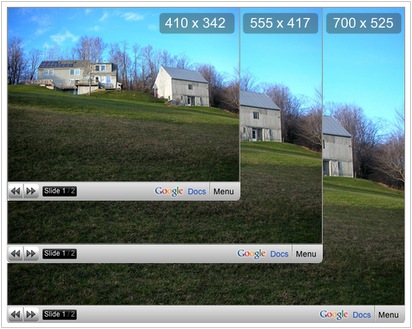
Google Docs just now has updated one feature where in which now we can embed multiple presentations of different sizes into one. These presentations can even be included in your blog posts, to add a presentation to your blog, you just need to create it in Google Docs and copy  the "Mini Presentation Module" into your blog spot. If you want to know more about How can we Embed Presentations in a Website then you need to go through this link: Embedding Presentations in a Web Site

embed presentations

Even you can include YouTube Videos, Images, and Text Contents (Captions) to your presentation slides and can consolidate to display a full graphical content in your blog posts.

Continue reading »

1 foot = ? inch, search criteria works perfect in Google Search

Monday, May 5, 2008

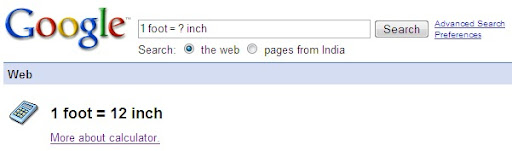
Google Search (Google built-in calculator) is awesome enough, when I type 1 foot = ? inch it gives me perfect answer, Actually my query to Google is "1 foot is equal to how many inches", when I enter the same query like "1 foot is equal to how many inches" in the Google Search Box, the Google Calculator has not given me the answer.

When I re-entered the query like "1 foot = ? inch" in Google search, it has given me the perfect answer and Google built-in calculator works fine. The Google's built-in calculator function can solve math problems involving basic arithmetic, more complicated maths. You can see the same in the screen shot below:

Google built-in calculator

You would like to know more about Google built-in calculator and other Google Web Search Features then click here to go.

Related Posts:
Recap GMail Keyboard Shortcuts
Export a presentation into PDF/PPT using Google Docs

Continue reading »

Now schedule your posts for future dates using Blogger

Friday, May 2, 2008

Good News! for Professional Bloggers, now time has come to go for a long vacation by leaving respective blogs, since blogger.com has introduced a new feature, now you can schedule your posts to future date and time.

Blogger

Blogger (blogger.com) now schedules future-dated posts, If you want to announce something new on a certain date and time now you need not to be at your computer desk to make a post and if you want your blog needs to be updated regularly with some posts when you are on Vacation, scheduled post publishing will help us in posting those important messages on time.

Its very simple to activate this feature, when you are drafting a post, on the post editor page, click on the "Post Options" just toggle to show the "Post date and time" fields. Then, type your relevant post date and time accordingly. When you click on the "Publish" button your post will be "Scheduled" accordingly to that date and time which you have entered. When the date and time of the post arrive then it will automatically published to your blog without your presence in front of your computer.

PostOptions

If you want to view your "Scheduled" Posts for this just click on "Edit Posts", in the "Edit Posts" table you can view your scheduled posts were listed there. In case if you want to Un-Schedule the post just simply save it as a draft any time before it gets published on to your Blog.

ScheduledLists

I would like to "Congratulate the Blogger.com Team" for this fabulous job. So Kudos to Blogger.com Team.

Continue reading »

All about DevBlogZone - India

Thursday, May 1, 2008

DevBlogZone is the zone where developers can learn and develop some innovative web applications. This site helps all sorts of developers in developing some new innovative things. Daily DevBlogZone used to post some good snippet, useful articles which are from basic to high-level.

DevBlogZone is all about programming (JavaScript, Java, MySQL, Ajax, YUI, Google API), Web Design (HTML, CSS, Adobe Tools - Photoshop, Flash...), Engineering and technology in general.

As the site name depicts, this site is fully related to developers who are starting their career and who want to develop there career in developing some good innovative things. This site not only posts about present technologies and even posts some past development technologies. DevBlogZone is striving hard to give up something useful info to the developers who want to learn online without going to the outside world, the developers can learn some innovative things by sitting and browsing through this site.

In this site you guys can even submit your own developed projects for free in all platforms, for the submission of your projects, please do contact Vivekanand @ email that is viveks.technology@gmail.com, If you want to promote your site through Ads, you can contact Vivekanand (viveks.technology@gmail.com), DevBlogZone will accept payment through Paypal. For other information please contact us.

In the long way run, DevBlogZone Team will deliver the best to the developers who really wish to surge ahead in life on their own without any support from others. So folks rock up your life with your own thoughts and ideas. DevBlogZone Team will look forward to see a change in everybody's life in the years to come.

Continue reading »

Official Google Gadgets API Blog: iGoogle sandbox launch, includes support for canvas view and OpenSocial

Monday, April 21, 2008

Official Google Gadgets API Blog: iGoogle sandbox launch, includes support for canvas view and OpenSocial Continue reading »

Organize your mail using filters in GMail

Sunday, April 20, 2008

Have you organized your messages when it comes to your inbox? No! then you guys need to do that. Filtering is a best option to organize your mail.

Filters actually allow you to manage the flow of incoming messages. Using filters, you guys can automatically archive messages, label, delete, star or forward your mails based on any combination of keywords, sender, recipients and much more.

So how to create filters in GMail, its simple:

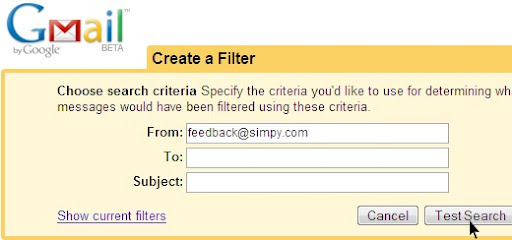
1. Click "Create a filter" beside "Search the Web" button
Click on CreateFilter  2. Enter your filter criteria
3. Click Test Search to see which messages currently in Gmail match your filter.
filter criteria 
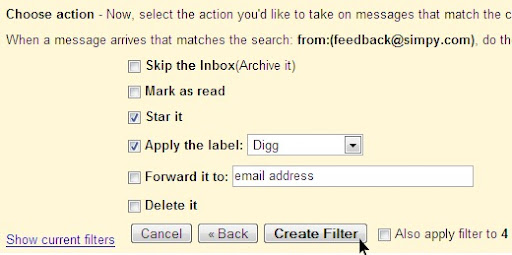
Select the action
4. Select one or more actions from the list
5. If you'd like to apply this filter to messages already in Gmail, select the Also apply filter to x conversations below checkbox. 
6. Lastly click "Create Filter"
create filter 
If you want to create a filter from within a message:

  1. Click the drop-down menu next to Reply.
  2. Select Filter messages like this.
  3. Enter your filter criteria in the appropriate field(s).

You guys can create an unlimited number of filters, but only 20 filters can forward to other addresses.

Continue reading »

Recap GMail Keyboard Shortcuts

Saturday, April 19, 2008

Today when I am drafting a mail to one of my friend through GMail, I am using mouse to work around in GMail, it was very difficult without a shortcut keys and keep on using mouse to work on the same - so I have gone through GMail Keyboard Shortcuts - its really helps us a lot to do the things in a smarter way. So I thought the same to share this to all the GMail users :)

To avail these case-sensitive shortcuts "on" or "off", once after logging into your GMail Account click "Settings", and then pick an option next to Keyboard shortcuts and enjoy while composing a message.

Just I want to Recap the things for the Users who are not using GMail shortcuts for making their life easier.....

You guys can view the below tables at this location as well (Just I reformatted for printing purpose): http://mail.google.com/support/bin/answer.py?answer=6594

Shortcut Key Definition Action
c Compose Allows you to compose a new message. <Shift> + c allows you to compose a message in a new window.
/ Search Puts your cursor in the search box.
k Move to newer conversation Opens or moves your cursor to a more recent conversation. You can hit <Enter> to expand a conversation.
j Move to older conversation Opens or moves your cursor to the next oldest conversation. You can hit <Enter> to expand a conversation.
n Next message Moves your cursor to the next message. You can hit <Enter> to expand or collapse a message. (Only applicable in 'Conversation View.')
p Previous message Moves your cursor to the previous message. You can hit <Enter> to expand or collapse a message. (Only applicable in 'Conversation View.')
o or <Enter> Open Opens your conversation. Also expands or collapses a message if you are in 'Conversation View.'
u Return to conversation list Refreshes your page and returns you to the inbox, or list of conversations.
e Archive Archive your conversation from any view.
m Mute Archives the conversation, and all future messages skip the Inbox unless sent or cc'd directly to you. Learn more.
x Select conversation Automatically checks and selects a conversation so that you can archive, apply a label, or choose an action from the drop-down menu to apply to that conversation.
s Star a message or conversation Adds or removes a star to a message or conversation. Stars allow you to give a message or conversation a special status.
! Report spam Marks a message as spam and removes it from your conversation list.
r Reply Reply to the message sender. <Shift> + r allows you to reply to a message in a new window. (Only applicable in 'Conversation View.')
a Reply all Reply to all message recipients. <Shift> +a allows you to reply to all message recipients in a new window. (Only applicable in 'Conversation View.')
f Forward Forward a message. <Shift> + f allows you to forward a message in a new window. (Only applicable in 'Conversation View.')
<Esc> Escape from input field Removes the cursor from your current input field.

<Ctrl> + s

Save draft

Holding the <Ctrl> key while pressing s when composing a message will save the current text as a draft. Make sure your cursor is in one of the text fields -- either the composition pane, or any of the To, CC, BCC, or Subject fields -- when using this shortcut.

#

Delete

Moves the conversation to Trash.

<Shift> + i Mark as read Mark your message as 'read' and skip to the next message.
<Shift> + u Mark as unread Mark your message as 'unread' so you can go back to it later.
[ Archive and previous Archive your conversation and move to the previous one.
] Archive and next Archive your conversation and move to the next one.
z Undo Undo your previous action if possible (for actions with an 'undo' link).
<Shift> + n Update current conversation Update your current conversation when there are new messages.
q Move cursor to chat search Move your cursor directly to the chat search box.
y Remove from Current View*
Automatically removes the message or conversation from your current view.
  • From 'Inbox,' 'y' means Archive
  • From 'Starred,' 'y' means Unstar
  • From 'Trash,' 'y' means Move to inbox
  • From any label, 'y' means Remove the label
* 'y' has no effect if you're in 'Spam,' 'Sent,' or 'All Mail.'
. Show more actions Displays the 'More Actions' drop-down menu.
? Show keyboard shortcuts help Displays the keyboard shortcuts help menu within any page you're on.


Combo-keys - Use the following combinations of keys to navigate through Gmail.
Shortcut Key Definition Action
<tab> then <Enter> Send message After composing your message, use this combination to send it automatically. (Supported in Internet Explorer and Firefox, on Windows.)
y then o Archive and next Archive your conversation and move to the next one.
g then a Go to 'All Mail' Takes you to 'All Mail,' the storage site for all mail you've ever sent or received (and have not deleted).
g then s Go to 'Starred' Takes you to all conversations you have starred.
g then c Go to 'Contacts' Takes you to your Contacts list.
g then d Go to 'Drafts' Takes you to all drafts you have saved.
g then i Go to 'Inbox' Returns you to the inbox.
g then t Go to 'Sent Mail' Takes you to all mail you've sent.
* then a Select all Selects all mail.
* then n Select none Deselects all mail.
* then r Select read Selects all mail you've read.
* then u Select unread Selects all unread mail.
* then s Select starred Selects all starred mail.
* then t Select unstarred Selects all unstarred mail.


These Shortcuts might help you to make your life easier.....

Continue reading »

Add Apps and customize your profile in Orkut

Thursday, April 17, 2008

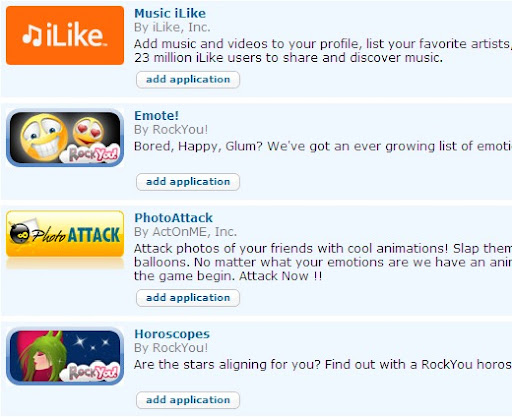
Orkut has introduced new feature, just add applications and customize your profile and increase your friends by sharing the applications. Applications are integrated directly into your orkut experience. When you log into your orkut profile, you will be able to add up to 25 applications to your orkut. Your valuable friends will see all the applications which you have added and be able to interact with the same, and can add any applications they like to their own profiles.

Now you guys can rock with these awesome enough applications and these applications includes like games, music, travel, books, horoscopes, movies etc.,

Orkut Apps
 
Orkut Applications

So guys! Rock with the new applications

Continue reading »

New features of Google Earth 4.3, Awesome!

Wednesday, April 16, 2008

The main features of Google Earth 4.3 has been showcased in a Video, which will depicts the features added in Google Earth 4.3, the Video is of 6 Minutes where in which it demonstrate the new features and it is really really Awesome. The features contain 3D buildings view, 3D navigation gadgets, Day/Night lighting effects, Street view etc., What to check out the new features! then need to download the software. Here is the link to download the same: http://earth.google.com/download-earth.html

Just download and check out the new features, its really awesome.

Continue reading »