Showing posts with label CSS. Show all posts

Adobe Photoshop website templates for free - colorifer.com

Friday, June 6, 2008

colorifer.com specializes in development of FREE and QUALITY Adobe Photoshop website templates. They create website templates in accordance with the standards, the rules of usability and Internet trends. 

colorifer

Templates are easy to customize. You just add your logos, text and graphics. Taking their style as a basis, you can create original, professional looking websites in short terms. The templates are given in Photoshop format. You can edit the templates in Adobe Photoshop as well as in any other programs reading PSD files. Our templates do not include html code. Working with website templates is a splendid opportunity to practise your web design skills. Website templates, are offered free-of-charge.

In this website you can view Latest Free Website Templates, Adobe Photoshop Tutorials and more over Wordpress themes which are customizable. In Resources page if you see there are awesome enough resources are present which are related to Adobe Photoshop, HTML Editors, Icons, Logotypes, Maps, Patterns, Site Submission, Stock Images, Text Generators, Web Hosting and Web Templates.

If you want to contact them for more information visit - contact us page
Continue reading »

A Cool and useful collection of Web Developer and Web Designer Resources!

Wednesday, May 28, 2008

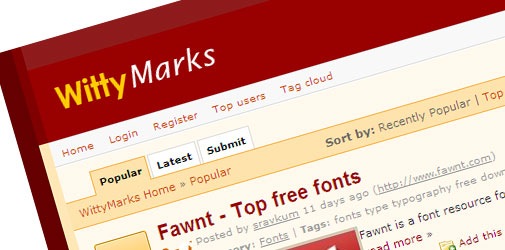
WittyMarks, a cool and really useful collection of web resources for designers and developers.

And the site was launched by the team of top blog WittySparks.com, as they want to keep this site clean and neat with fully functional and useful resources like wordpress themes, plugins, open source scripts, javascripts, css tips, menus, widgets, tutorials, php, earn money, etc.

wittymarks

And this site just bookmark the best resources available to just serve the fellow developers around. In this regards this site have the registration open to all but the submissions are disabled unless a particular user is really want to contribute the best resources than submitting their own blog posts to promote themselves, to be a part of the team and to contribute the useful resources you just need to participate in their site regularly by voting the posts which you think is more useful and comment.


As the site is recently launched they already have a cool resources to look into, so why not encourage their team to submit more useful resources.

Subscribe RSS Feeds:
Just keep yourself updated with new resources everyday, don't forget to subscribe for the same - RSS Feeds 

Continue reading »

Importance of !important in CSS

Monday, May 26, 2008

Do you know What does !important mean in CSS?, an "!important" declaration (the keywords "!" and "important" follow the declaration) this takes high precedence over a normal declaration. And can be framed in this way, this means that the styles are applied in order as they are read by the browser.

CSS it tries to create a balance of power between author and user style sheets. By default, rules in an author's style sheet override those in a user's style sheet. But in CSS1, this is in other way round - Author "!important" rules took precedence over User "!important" rules.


For Example:
User's Style Sheet:
   1: <style> 
   2:   p{font-size: 2em !important;} 
   3:   p{font-style: italic;} 
   4: </style>

Author's Style Sheet:
   1: <style> 
   2:   p{font-size: 3em;} 
   3:   p{font-style: normal;} 
   4: </style> 

If you see in the above instance, the first rule in the User's Style Sheet has "!important" declaration, which will overrides the first rule in the Author's Style Sheet. And if you observe for the second rule in User's Style Sheet it does not contain "!important" so this will be ruled out because here second rule in the Author's Style Sheet has got high preference so the HTML will render by taking size as "p{font-style: normal;}"

If you would like to know more on this, then check with the w3 site: w3.org and move to the section called "6.4.2 !important rules"


Continue reading »

Evolution of rounded corners from using Images to using CSS

Sunday, May 25, 2008

Earlier, if we want to create Rounded Corners in HTML we used to make use of Images to get that effect in HTML and now everything has changed a lot and we make use of pure CSS to render the html box in rounded corner style.

To create rounded corners in HTML, some of the developers still use images to get a box into rounded with the desired color or what ever. For that to render will take so much of time and if at all we miss one of the images the box will look messy.

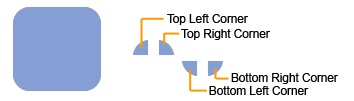
For instance: Check out the below screen shot, if we want to create the rounded corner box. Below is the scenario (this is using Images)

Rounded Corners

We used to create four images for our corners. Most graphics programs have a tool that will create rounded-off squares. In the spot where you want the box to show up, just create a container div to hold the box, a div for the top row and a div for the bottom row. Between the top and bottom rows, you can add your valuable content to show up in the rounded corner box.

HTML Code:
   1: <div class="roundedcontainer">
   2:    <div class="roundedtop">
   3:      <img src="tl.gif" alt="" 
   4:      width="15" height="15" class="corner" 
   5:      style="display: none" />
   6:    </div>
   7:  
   8:    <p>Lorem ipsum dolor sit amet, consectetur adipisicing 
   9:    elit, sed do eiusmod tempor incididunt ut labore et 
  10:    dolore magna aliqua. Ut enim ad minim veniam, quis 
  11:    nostrud exercitation ullamco laboris nisi ut aliquip 
  12:    ex ea commodo consequat</p>
  13:
  14:    <div class="roundedbottom">
  15:      <img src="bl.gif" alt="" 
  16:      width="15" height="15" class="corner" 
  17:      style="display: none" />
  18:    </div>
  19: </div>

CSS Code:
   1: .roundedcontainer {
   2:     width: 250px;
   3:     background-color: #f90;
   4:     color: #fff;
   5: }
   6: .roundedcontainer p {
   7:     margin: 0 10px;
   8: }
   9: .roundedtop { 
  10:     background: url(tr.gif) no-repeat top right; 
  11: }
  12: .roundedbottom {
  13:     background: url(br.gif) no-repeat top right; 
  14: }
  15: img.corner {
  16:    width: 15px;
  17:    height: 15px;
  18:    border: none;
  19:    display: block !important;
  20: }

I agree this works fine in IE6, Mozilla 1.3, and Opera 7 on Windows. But to render those images might take some time and what will happen if we forgot the image to include or upload, the box looks messy right? Yes!

In these scenarios, you can make use of pure CSS to get that rounded curve with out images. And in no time the box will render perfectly with Rounded Corner, Would you like to know how? “Nifty Corners” has made it possible, below is the code for rendering the HTML box into rounded corners style by using only CSS styles. Isn’t it awesome YEAH! Thanks to Nifty Corners, in helping us in all the way!

Content courtesy “Nifty Corners”:

HTML Code:
   1: <div id="container">
   2: <b class="rtop">
   3:   <b class="r1"></b> <b class="r2"></b> <b class="r3"></b> <b class="r4"></b>
   4: </b>
   5: <!--content goes here -->
   6: <b class="rbottom">
   7:   <b class="r4"></b> <b class="r3"></b> <b class="r2"></b> <b class="r1"></b>
   8: </b>
   9: </div>

CSS Code:
   1: .rtop, .rbottom{display:block}
   2: .rtop *, .rbottom *{display: block; height: 1px; overflow: hidden}
   3: .r1{margin: 0 5px}
   4: .r2{margin: 0 3px}
   5: .r3{margin: 0 2px}
   6: .r4{margin: 0 1px; height: 2px}

If you want to see the example, how it renders – click here

Continue reading »

tutorialsgarden.com, free tips everyday

Saturday, May 24, 2008

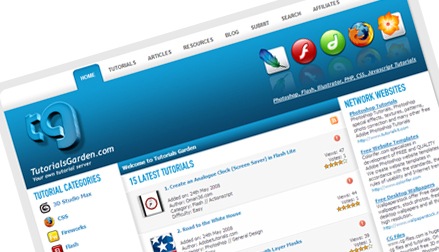
tutorialsgarden.com is a very interesting site which provides everyday a lot of great and free web resources for designers and developers in order to help them to find new ideas and save time and money in their work. This is a awesome website which I have seen, because I used to visit this site daily and used to take some tips in designing as well as in developing.

Tutorials Garden

If I want to design any site or any template, first I used to check awesome enough tutorials in this site and used to learn something, as I have said I am learning designing in my earlier posts. This is a very good place to learn the things very quickly and its free too. It will save time as well money.

On tutorialsgarden.com you can find almost everything you need in a simple way and browsing site categories, you can reach to resources related to 3D Studio Max, CSS, Fireworks, Flash, Freehand, Gimp, HTML & XHTML, Illustrator, JavaScript, Maya, Photoshop, PHP, Rhino 3d, Ruby On Rails, Unix, Windows, ZBrush...

Subscribe RSS Feed
There are more than 2,000 free resources to learn all the above mentioned tools and more are added daily, In order not to miss the new resources visit the website tutorialsgarden.com and make sure to grab RSS Feeds for Tutorials and keep updated knowledge on those tools.

Submit
Here in this site you can also submit your own tutorials, and can get huge traffic to your tutorial and website.

Continue reading »

Aqua Gloss Icons PSD for Free

Monday, May 19, 2008

Designers who would like to design Gloss Icons using Photoshop, here is a right place to check in - DezinerFolio, which is a design related web blog were in which you can download tons of design stuff's for free, and this is the right place to begin with.

Dezinerfolio


If you want to learn Photoshop / CSS / Flash / Design tricks then you guys need to view the web blog of DezinerFolio. In this web blog you find a separate slot for downloads, were you can find tons of great designs. Even in this blog you can find JavaScript related applications which are awesome enough.

Here is the link to download Aqua Gloss Icons PSD - download

A very good site to check out!

Continue reading »

174 and more table free designs with W3C Standards

Tuesday, May 6, 2008

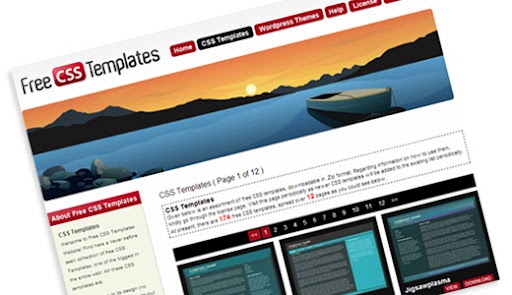
A good collection of Free CSS Web Templates with table free designs, these web templates are built using pure CSS without tables.

These designs have got good features like:
1. Table free in its design (no tables have been used for layout purposes).
2. The templates are light weight, so that it won’t take too long to load.
3. W3C Standard compliant.
4. Comes with public domain photos, provided by Wikimedia Commons and PDPhoto.org.
5. And comes FREE under the Creative Commons Attribution 2.5 license.

Templates are provided to us in .ZIP format. I would like to recommend http://www.free-css-templates.com for reference to learn CSS and to follow W3C Standards Strictly.

free css templates

Continue reading »

All about DevBlogZone - India

Thursday, May 1, 2008

DevBlogZone is the zone where developers can learn and develop some innovative web applications. This site helps all sorts of developers in developing some new innovative things. Daily DevBlogZone used to post some good snippet, useful articles which are from basic to high-level.

DevBlogZone is all about programming (JavaScript, Java, MySQL, Ajax, YUI, Google API), Web Design (HTML, CSS, Adobe Tools - Photoshop, Flash...), Engineering and technology in general.

As the site name depicts, this site is fully related to developers who are starting their career and who want to develop there career in developing some good innovative things. This site not only posts about present technologies and even posts some past development technologies. DevBlogZone is striving hard to give up something useful info to the developers who want to learn online without going to the outside world, the developers can learn some innovative things by sitting and browsing through this site.

In this site you guys can even submit your own developed projects for free in all platforms, for the submission of your projects, please do contact Vivekanand @ email that is viveks.technology@gmail.com, If you want to promote your site through Ads, you can contact Vivekanand (viveks.technology@gmail.com), DevBlogZone will accept payment through Paypal. For other information please contact us.

In the long way run, DevBlogZone Team will deliver the best to the developers who really wish to surge ahead in life on their own without any support from others. So folks rock up your life with your own thoughts and ideas. DevBlogZone Team will look forward to see a change in everybody's life in the years to come.

Continue reading »

Instant tutorial for developing Calendar Component using YUI

Sunday, March 23, 2008

Have you guys implemented Calendar Component using YUI, it is quick to implement and will take not more than few minutes, even you can customize the component according to your needs in your projects. Customization like Creating a Multi Month Calendar View, Setting Configuration Options, Enabling the Calendar Navigator, Obtaining Selected Dates, Creating International Calendars, Customizing Events etc., Its great right!

So Guys! if you want to implement the Calendar Component right now! below is the code for you:
Place the below code in <head>.....</head> tag of your HTML page

<style type="text/css">
body {
margin:0;
padding:0;
}
</style>
<link rel="stylesheet" type="text/css" href="http://yui.yahooapis.com/2.5.1/build/fonts/fonts-min.css" />
<link rel="stylesheet" type="text/css" href="http://yui.yahooapis.com/2.5.1/build/calendar/assets/skins/sam/calendar.css" />
<script type="text/javascript" src="http://yui.yahooapis.com/2.5.1/build/yahoo-dom-event/yahoo-dom-event.js"></script>
<script type="text/javascript" src="http://yui.yahooapis.com/2.5.1/build/calendar/calendar-min.js"></script>

Place class="yui-skin-sam" in <body> like below

<body class=" yui-skin-sam">

Now Start putting the below code in between the <body class=" yui-skin-sam">.....</body> tags
<div id="cal1Container"></div>
<script type="text/javascript">
YAHOO.namespace("example.calendar");
YAHOO.example.calendar.init = function() {
YAHOO.example.calendar.cal1 = new YAHOO.widget.Calendar("cal1","cal1Container");
YAHOO.example.calendar.cal1.render();
}
YAHOO.util.Event.onDOMReady(YAHOO.example.calendar.init);
</script>

Close body as well as html tags
</body></html>


Below is the snap shot of the Calendar Component which you get after implementing:

Calendar Component

Hope this tutorial may help you in implementing Calendar Component.... :)
Continue reading »

free tutorials, free templates, Royalty Free Textures and much more in only one website

Sunday, March 16, 2008

Do you want to learn 3D Studio Max, Adobe Photoshop, Adobe Illustrator, Adobe Indesign, Dreamweaver.... etc.... for free - yes! what you have seen is right absolutely free.... and that to through only one website that is http://www.stockvault.net/

Stockvault

This site is helping us in learning the things very quickly and believe that this site is providing us free stock photos as well, there are approximately 9456 free stock photos of different categories and may change the number in future. Isn't it awesome enough. You guys can use images for personal as well as for education projects that is for non-commercial usage. Lots more in this site - just surf the things accordingly and enjoy your work life happily....

Rockup the Web World! Yo! Yo! Continue reading »